50% OFF for the first 6 months — open beta
SoWork alternative

A virtual office, not another suite.
Meet PixelHall.

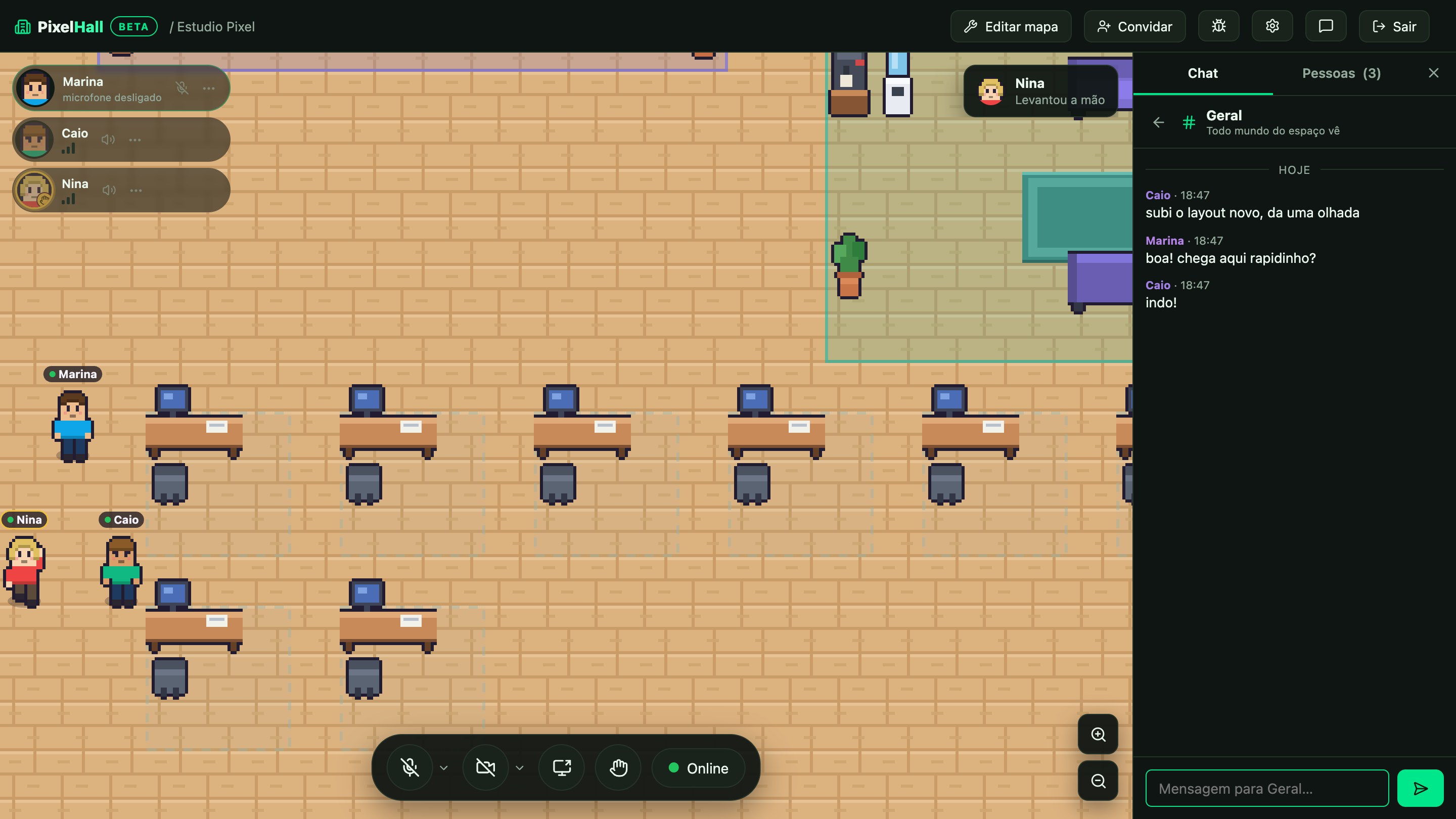
Your team walks around the map, gets close and talks — proximity audio, video, screen sharing, lockable rooms and a desk for each person. No task management bolted on top, no productivity report, no training needed to start.

Free for up to 10 people at the same time · no card · price on the page

The PixelHall office: pixel-art characters walking between desks, with video and chat open
Why teams shop around

Four reasons we hear every week

People who come to us looking for a different virtual office are usually after one of these four things.

01 An office, not a platform

Tasks, documents and goals already live somewhere. What is missing is the place to be together. PixelHall does one thing and never asks the team to leave the rest behind.

02 The price on the page, not in a meeting

Four tiers written right below, in dollars, per month. You subscribe by card on your own and cancel from the portal on your own — no mandatory demo, no "contact sales".

03 Adoption without training

Arrow keys to walk, get close to hear. Whoever arrives for the first time understands it in minutes — no guided tour, no manual, nobody on the team turning into a full-time admin.

04 Presence without surveillance

Seeing who is in the office is useful; measuring how many minutes each person stayed is not. There is no hours report, no presence score, and no call is ever recorded.

Checklist

What to look at before you choose

Use this list to size up any virtual office — ours included. The right-hand column is what PixelHall does today.

What to checkIn PixelHall
How wide the tool reachesThe office only: presence, proximity audio, video, screen sharing and chat. No task, goal or document management.
Where the price isOn this page. Four monthly tiers in dollars, self-serve signup and self-serve cancellation, with no sales conversation on the way.
How the price growsPer space, not per person. The same price whether the space is empty or full.
Time until the team is inMinutes. The office is generated from the size of your team, you send the link and people join in the browser.
Monitoring of who worksNone. No hours report, no presence score, no call recording.
Keeping a conversation privateLockable rooms and a desk you can lock. Voice and video go straight between browsers (P2P) and never touch our servers.
InstallationNone. Browser, on the computer and on the phone. Optional desktop app for Windows.
How guests get inA link with an expiry date, name only. No account, no download. Revoke the link and the access ends.
The map is yoursA full editor. The office is generated to fit, and after that you move rooms, desks and objects as you like.
LanguagesEnglish, Portuguese and Spanish in the product and on the public pages.
Trying before payingA genuinely free plan (10 people, the whole product) and 7 days on any paid plan.

We only speak for ourselves. Any other tool's features and prices change over time, so we would rather you check them at the source and compare against this column — than trust a table we drew up.

What you get

The essentials, done well

Proximity audio

In the open hall you hear the people near you, with the volume fading with distance — and you can see on the map how far your voice reaches.

The screen becomes a stage

Share your screen and it opens front and centre for everyone, with the cameras on a rail beside it. Esc closes the stage and gives the map back.

Lockable rooms

Sensitive meeting? Lock the room: whoever arrives knocks and you decide whether to open. Unlock it and it is an open room again.

A desk of your own

Members pick their own desk and it stays reserved. A shortcut takes you there, and the lock says it is focus time.

Chat that follows the place

A channel for the space, groups and direct messages. Room conversation is of the moment — it starts and ends there, never becoming a transcript.

An invite in one link

Members have an account, a desk and always get in. Guests join with just their name, through a link with an expiry date. Revoke it and the access ends.

Plans

The whole price, right on the page

The plan caps how many people are in the space at the same time. Members have a guaranteed seat and always get in; the remaining seats take guests.

Launch: 50% off for the first 6 months, on any paid plan.
Sold out Free up to 10 people at the same time
US$ 0
no card

The free spaces of the beta have run out — we are working on releasing more. In the meantime, trial any plan for 7 days.

Start for free
Start up to 15 people at the same time
US$ 30US$ 15/mo
for 6 months, then US$ 30/mo Subscribe to Start
Team up to 25 people at the same time
US$ 50US$ 25/mo
for 6 months, then US$ 50/mo Subscribe to Team
Office up to 35 people at the same time
US$ 70US$ 35/mo
for 6 months, then US$ 70/mo Subscribe to Office

7-day trial on any paid plan: add the card, use everything for a week, and the first charge only happens at the end of the period. Cancel from the portal, without talking to anyone.

Frequently asked

What people comparing tools ask

Is PixelHall a SoWork alternative?

It is an independent product in the same category: a virtual office with a map, characters and proximity audio, running in the browser. We have no affiliation, partnership or relationship with SoWork, and PixelHall is not derived from it — it was written from scratch.

Does PixelHall manage tasks and projects too?

No, and that is a choice. PixelHall is the place where the team is together and talks: presence, voice, video, screen and chat. Tasks, documents and projects stay in the tools your team already picked — nothing to migrate, nothing to abandon.

How long until the team is up and running?

Minutes. You say how many people you expect, pick a layout, and the office comes out with rooms and desks to match. Send the link and people join in the browser — guests with just their name, no account and nothing to install.

Do you track how long each person worked?

No. There is no hours report, no presence score and no call recording. Voice and video travel straight between browsers and never pass through our servers — we could not listen in even if we wanted to.

What does PixelHall cost?

The price is public and per space: free for up to 10 people at the same time, then Start (15 people, US$ 30/mo), Team (25, US$ 50/mo) and Office (35, US$ 70/mo), at 50% off for the first 6 months of the launch. You subscribe by card and cancel from the portal, without talking to anyone.

Do I need to install anything?

No. It runs entirely in the browser, on the computer and on the phone. There is an optional desktop app for Windows, with a bar that follows you while you share your screen, system notifications and a global mute shortcut.

What if the team grows?

Switch plan from the space's own screen, on the spot. If the team shrinks, the way back is the same: cancel from the portal, the space returns to the free plan, and nobody already inside is thrown out.
Start on the free plan, decide later

Create the space, send the link to your team, and see what talking while walking around a map feels like.

Create my office for free